
 Database Join
Description
The Database Join transform allows you to run a query against a database using data obtained from previous transforms.
Usage
The parameters for this query are specified as follows:
The data grid in the transform properties dialog. This allows you to select the data coming in from the source hop. As question marks (?) in the SQL query. When the transform runs, these will be replaced with data coming in from the fields defined from the data grid. The question marks will be replaced in the same order as defined in the data grid. For example, Database Join allows you to run queries looking up the oldest person who bought a specific product as shown below:
| the Database Join transform gives you more flexibility than the standard Database Lookup transform. Keep in mind that your query determines the performance of this transform. |
SELECT      customernr
FROM        product_orders, customer
WHERE       orders.customernr = customer.customernr
AND         orders.productnr = ?
ORDER BY    customer.date_of_birth
The grid is then defined as follows:
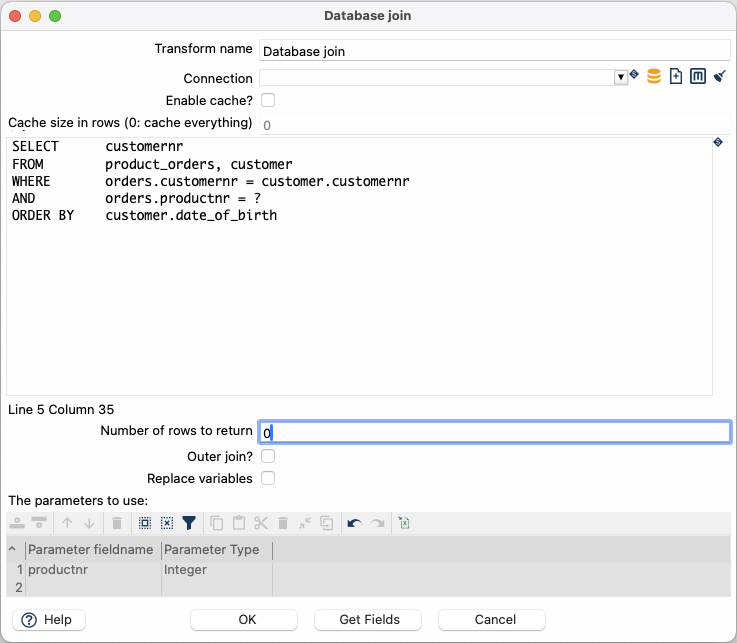
When the transform runs, the (?) placeholder defined in the SQL query will be replaced with the incoming productnr field value from the source hop. To define and use multiple parameters, list the fields in order you want them to be replaced in the SQL statement.
Load SQL from a file
You can keep the query in the SQL editor, or load it from an external .sql file with Load SQL from file.
Use a VFS path; variables in the path (for example ${PROJECT_HOME}/sql/lookup_records.sql) are resolved.
The file is read once when the transform initializes, not once per incoming row.
When a path is set, the SQL editor shows a read-only preview of the file contents.
Question marks (?) in the file still bind to the Parameters table in the same order as for inline SQL.
Leave the path empty to edit the query in the dialog (the previous default).
Enable Replace variables to substitute Hop variables in the SQL (inline or loaded from the file) before the statement is prepared.
Options
| Option | Description |
|---|---|
Transform name |
Name of the transform; This name has to be unique in a single pipeline |
Connection |
The database connection to use for the query. |
Enable cache? |
Enables caching of database lookups. This means that once a key (or group of key) has been looked up, the looked up values are stored, and returned again the next time this key (or group of key) is being looked up (without incurring the cost of a database call). Important: If other processes are changing values in the table where you perform a lookup, do not cache values. In all other instances, caching values increases the performance substantially because database lookups are relatively slow. If you can’t use the cache, consider launching several copies of the simultaneously. A simultaneous launch keeps the database busy through different connections. See Launching several copies of a transform. |
Cache size in rows |
The size of the cache (number of rows), 0 means cache everything. |
SQL |
SQL query to form the join; use question marks ( |
Load SQL from file |
Optional VFS path to a |
Replace variables |
Substitute Hop variables (for example |
Number of rows to return |
Zero (0) returns all rows; any other number limits the number of rows returned. |
Outer join? |
Enable to always return a result, even if the query did not return a result |
Parameters table |
Specify the fields containing parameters. The parameter type is required. |