
Workflows
What Workflows Actually Do
Workflows are the orchestrators of Apache Hop. Where pipelines are the streaming workers that process rows of data, workflows are the managers that coordinate jobs: they ensure prerequisites are met, fetch required files, trigger child pipelines and workflows in the proper order, react to errors, and send notifications.
Workflows manage the operational lifecycle of your data platform:
-
Environment Preparation & Health Checks: Verify that target databases are reachable, ping remote servers, check whether webservices are online, and verify disk space before launching heavy data jobs.
-
File & Storage Lifecycle: Download files via SFTP or cloud storage (S3, GCS, Azure Blob), decompress zip archives, verify file existence, decrypt sensitive files with PGP, move processed files to archive folders, and purge temporary data.
-
Coordinating Child Pipelines & Workflows: Launch pipelines using the Pipeline action, pass parameters and variables down to child tasks, and collect execution status and summary rows.
-
Resilient Error Handling & Recovery: If a pipeline or action fails, a workflow can follow an alternate error route: retry the failed action, run a cleanup script, roll back transactions, and send alerts.
-
Alerting & Auditing: Send email notifications, dispatch Slack messages, post Nagios or SNMP traps, and log audit information to tracking tables.
Under the Hood: How a Workflow Executes
Workflows operate very differently from pipelines. While a pipeline is an active network of parallel streaming transforms, a workflow is a deterministic state machine that executes step by step.
1. The Sequential Nature
Workflows run one action at a time in sequence by default:
-
Execution begins at a single mandatory starting point: the Start action.
-
An action executes its complete task (e.g. checking a file or running a pipeline) and waits until it finishes.
-
Upon completion, the action generates an exit status indicating whether it succeeded or failed.
-
The workflow engine inspects the exit status and uses it to choose which outgoing hops to follow next.
2. Conditional Hops & Decision Routing
Unlike pipeline hops (which continuously stream data rows), hops between actions in a workflow act as conditional decision gateways:
| Hop Type | Visual Indicator | When the Next Action Runs |
|---|---|---|
Unconditional Hop |
Solid Black |
Always, regardless of whether the previous action succeeded or failed. |
Success Hop |
Solid Green |
Only when the previous action succeeded (returned true / zero errors). |
Failure Hop |
Dashed Red / Orange |
Only when the previous action failed (returned false or encountered an error). |
By combining success and failure hops, you can build self-healing data workflows that automatically recover from network glitches, missing files, or data quality exceptions.
3. The Backtracking Path Exploration Algorithm
What happens when an action connects to multiple outgoing hops, or when a workflow branches into different paths?
Hop uses a depth-first backtracking algorithm to traverse the workflow graph:
-
Branch Evaluation: When an action completes, Hop evaluates all outgoing hops that match its exit status.
-
Depth-First Traversal: Hop selects the first valid path and follows it sequentially to its final terminus.
-
Backtracking: When that branch reaches an end point (or encounters a blocked condition), the workflow engine backtracks to the last decision fork and begins traversing any other valid branches that have not yet run.
-
Result Aggregation: Once all valid branches have finished, Hop combines the results, error counts, and logs from every explored branch into the overall workflow result.
4. Variables, Parameters, and Data Passing
While workflows do not stream individual rows over hops, they provide powerful tools for passing context:
-
Setting Dynamic Variables: Use the Set Variables action to read configuration files, extract runtime parameters, and make variables available to all downstream child pipelines and workflows.
-
Passing Parameters: Pass parameters down to child pipelines and child workflows explicitly, keeping your jobs modular and reusable (
Passing parameters to a child). -
Result Rows & Files: When a pipeline produces a small summary list of rows (via
Copy rows to result), a workflow can capture those rows and loop over them using child workflows (Loops in Apache Hop). See Action results for what an action passes on to the next one. -
Parallel Action Branches: When an action must trigger multiple independent tasks simultaneously, you can enable parallel execution on that action (
Parallel execution in workflows), and optionally re-synchronize them using the Join action.
Workflow Execution Engines
Like pipelines, workflows are pure metadata (.hwf) and are decoupled from where they execute through a Workflow Run Configuration.
Hop provides three workflow execution engines:
| Engine | Best For | How It Operates |
|---|---|---|
Workstations, local testing, and standard production servers. |
Executes actions sequentially on the local computer or server within the local Hop JVM. |
|
Offloading orchestration to dedicated servers. |
Dispatches the workflow to execute on a remote Hop Server via HTTP, streaming execution progress and logs back to the caller. |
|
Spreading separate workflow runs over a group of servers. |
Assigns each workflow to one server from a configured group, using an even-load or pack algorithm, and retries on another server when the chosen one is at capacity. |
Popular Real-World Scenarios
Here is how workflows are commonly applied across enterprise data platforms:
1. Production Nightly Batch Orchestration
A master workflow executes every night to run your organization’s core ELT batch:
-
Connects to database servers and validates connectivity (
Check Db connections). -
Checks whether new source data files have landed in cloud storage (
Checks if files exists). -
Executes a series of ingestion pipelines in order, passing the current processing batch date as a parameter.
-
If ingestion succeeds, runs the dimensional modeling or Data Vault pipelines.
-
Archives processed input files to long-term S3 / Azure cold storage (
Move files). -
If any step fails, follows the failure hop to notify the on-call data engineering team via email or Slack (
Mail).
2. Containerized Workflows on Kubernetes & Docker
Workflows are frequently packaged into Docker containers and scheduled as Kubernetes CronJobs or cloud container tasks.
The container starts headlessly using the hop-run CLI command (hop-run -j MyProject -e production -f /path/to/workflow.hwf), executes the workflow, logs output to stdout, and exits with a standard status code (0 for success, non-zero for failure).
See Hop in Docker and hop-run.
3. External Orchestration with Apache Airflow
Many organizations use Apache Airflow as an enterprise scheduler while using Apache Hop for data processing. Airflow DAGs trigger Hop workflows using the BashOperator, DockerOperator, or KubernetesPodOperator. The Hop workflow manages its internal conditional branching and pipeline execution, reporting overall status back to Airflow. See Run Hop in Apache Airflow.
4. Automated Regression Testing in CI/CD
Workflows can automate your project’s testing strategy before any code is promoted to production. Using the Run pipeline unit tests action, a workflow discovers and executes every unit test in your Hop project. If any pipeline transformation produces unexpected test results, the action fails, halting the CI/CD pipeline and preventing bad code from being deployed.
5. Python-Driven Workflow Execution with PyHop
Data applications written in Python can load, configure, and execute Hop workflows programmatically using PyHop. The Python application can pass dynamic runtime parameters, start workflow execution, monitor real-time progress, and evaluate the final result.
Example Workflow Walk-Through
The example below shows a typical real-world workflow design:
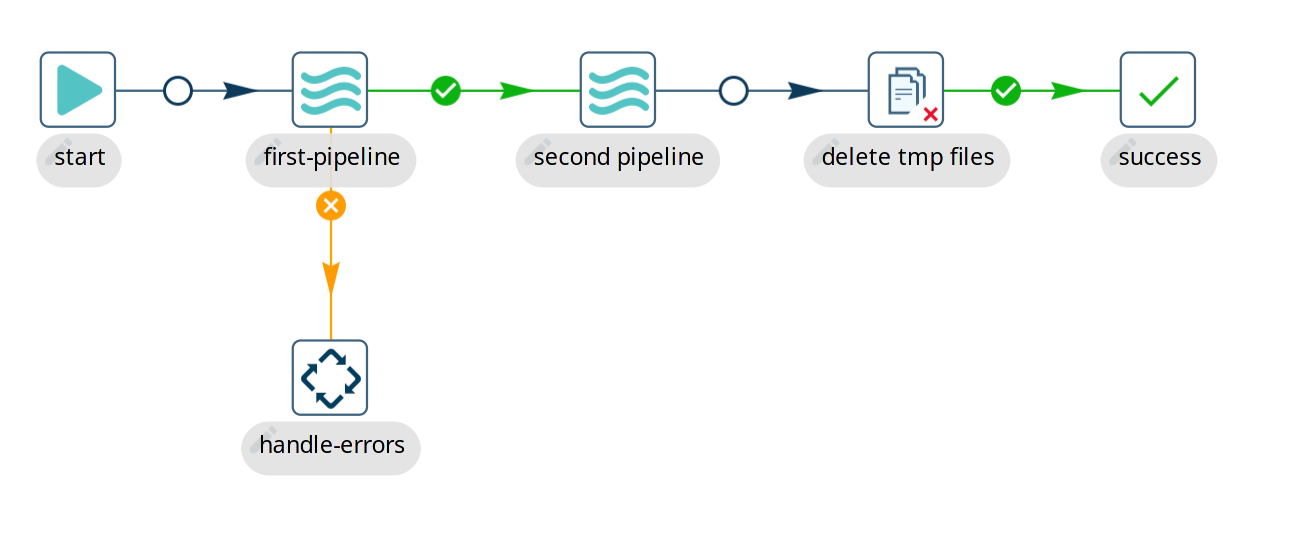
When this workflow executes:
-
Execution starts at the Start action, which can never fail, and follows the unconditional hop.
-
The
first-pipelineaction runs its designated pipeline. -
If
first-pipelinesucceeds, the workflow follows the green success hop tosecond-pipeline. -
If
first-pipelinefails, the workflow follows the orange/red failure hop tohandle-errors, skippingsecond-pipeline. -
After
second-pipelineruns, the workflow moves along an unconditional hop todelete-tmp-filesto ensure temporary files are removed regardless of outcome. -
If cleanup succeeds, execution arrives at the
successaction, marking the entire workflow as successfully completed.
Next Steps
To dive deeper into building and managing workflows, explore:
-
Create a Workflow — Step-by-step instructions for creating, configuring, and saving workflows.
-
Run and Debug a Workflow — How to execute workflows in Hop GUI, view logs, and inspect action metrics.
-
Workflow Actions Catalog — Browse the complete catalog of over 80 workflow actions.
-
Workflow Run Configurations — Configure local, remote, and clustered workflow execution.
-
Scheduling Workflows and Pipelines — Built-in repeating schedules and external scheduling options.
-
Parallel Execution in Workflows — How and when to fork parallel action branches.
-
Loops in Apache Hop — Techniques for looping over files, records, or dates in workflows.
-
Avoiding Deadlocks — Best practices for designing reliable, deadlock-free orchestration graphs.