
 Watch Files
Description
Watch Files is a continuously running source transform. It emits a metadata row for a matching file that is created, modified or deleted. Use exactly one copy with the normal Local Hop Engine, including that engine on Hop Server. Stop the pipeline to end monitoring, or configure an optional maximum run time in General.
Get File Names lists files in a finite operation. Wait for file waits for one filename in a workflow and can wait for it to stop growing. Watch Files maintains a directory’s observed state across runs and produces a stream of changes. Neither existing component is changed.
Local WatchService hints ----+
                             +--> Compare filesystem with observed state
VFS polling snapshots -------+               |
                                      Coalesce by URI
                                             |
                                      Check stability
                                             |
                                      Emit a Hop row
                                             |
                                 Acknowledge observed version
                                             |
                                   Periodic JSON checkpoint
Configuration
The dialog has three tabs:
-
General: folder, pattern syntax, filename filters, recursion, event types, file readiness and first-start behavior. Visible examples follow the pattern syntax selected in General.
-
Advanced: detection strategy, intervals, resource limits, checkpoint location/identity and diagnostic tuning. Stability check details are hidden when readiness checking is disabled; native-only settings are hidden for explicit polling. Native detection shows Reconciliation interval and hides Polling interval; Automatic shows both because its detection method is chosen at startup. The retained polling value still controls retries in native mode; switch to Automatic to edit it. Hover help follows the selected strategy and filename syntax. Hidden values are preserved. Minimum file age still applies when readiness checking is disabled.
-
Maintenance: View status, Create backup and Reprocess files. Advanced recovery reveals Clear saved history, Restore backup and Update saved-state format. The result panel appears after an operation; the reprocessing filter opens only when choosing Reprocess files.
General shows State identifier: Automatic for the generated UUID, or State identifier: Saved for an existing custom ID. Hover over it to inspect the actual saved value. New transforms receive a generated Watch ID once, saved in the pipeline. Existing IDs and state directories are preserved. To edit the value deliberately, select Advanced → Edit state identifier. Turning editing off hides the field and retains its value; it never generates another ID. The editing preference is saved in the pipeline and does not affect checkpoint identity or validation of the directory and filters.
The default state directory for new transforms is <user-home>/.hop/watch-files, persisted as an explicit local path.
Review that path when moving a pipeline to another host, and configure a directory outside the watched tree if watching the user home directory or an ancestor.
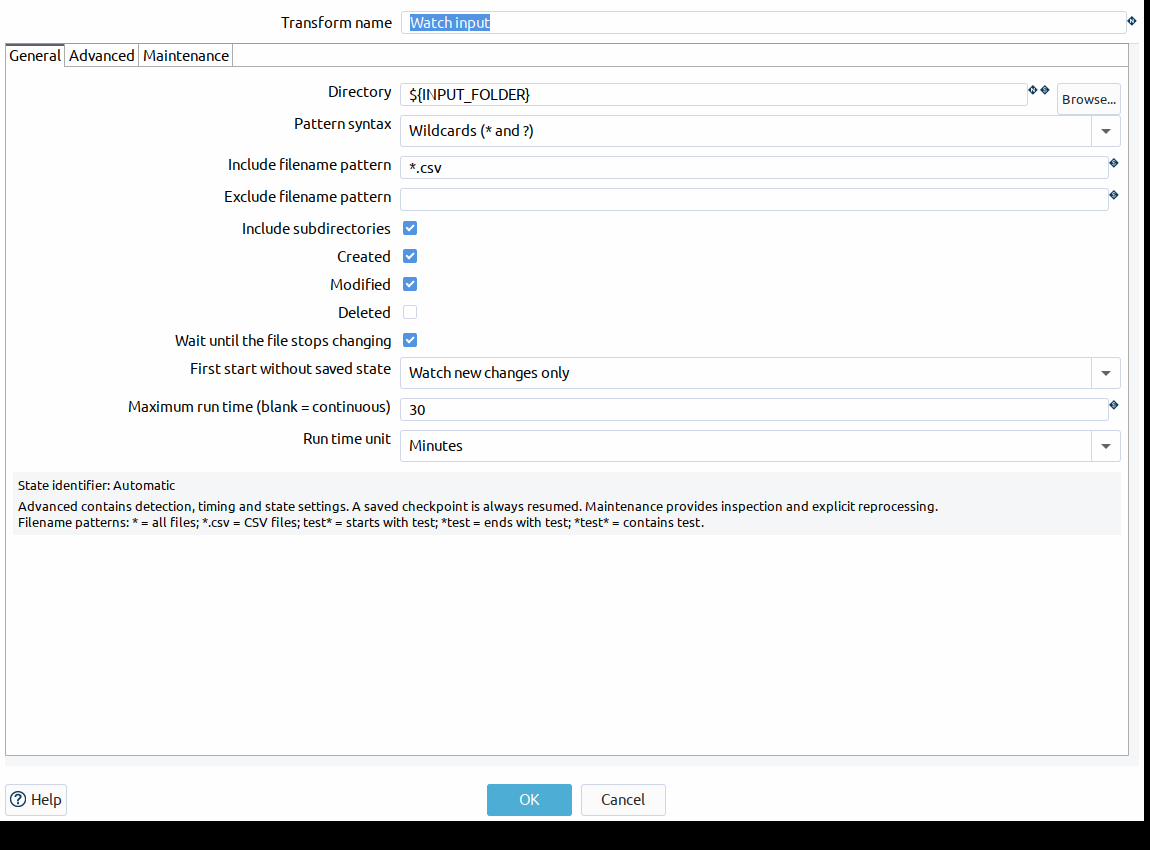
All paths, patterns and numeric settings accept Hop variables. Intervals are integer milliseconds (1 to 2147483647; minimum age also accepts zero). Maximum run time uses a positive number of minutes or hours, including decimals with a decimal point, or a variable. Blank means continuous monitoring. Timing begins when row processing starts, after initialization, and uses monotonic elapsed time. When the duration expires, the source saves acknowledged observations and signals normal end of input. Downstream rows already delivered can finish, and unacknowledged changes can be detected on the next run with the same state identifier. This is a cooperative limit: an in-progress filesystem operation, checkpoint or downstream handoff can delay completion. It is not a deadline for the entire pipeline or its downstream work. Expressions match the entire short filename, as in Get File Names; exclusion wins. Empty include/exclude expressions mean include all/exclude none. Only regular files generate rows; directories are traversed but never emitted.
| Option | Default | Description |
|---|---|---|
Directory |
Required |
Directory to monitor. Variables and named VFS connections are supported. |
Edit state identifier |
Off |
Advanced option that reveals the saved identifier for manual editing. Hiding the field retains the identifier and its history. |
State identifier (Watch ID) |
Generated for new transforms |
Stable identifier saved in the pipeline, independent of the transform name. Existing IDs are retained; enable Edit state identifier in Advanced to change it. A different ID starts a separate history without overwriting the previous checkpoint. |
Pattern syntax |
WILDCARD for newly created transforms; REGEXP for existing XML without the setting |
WILDCARD uses |
Include filename pattern |
Empty |
Pattern using the selected syntax. Empty includes all files. |
Exclude filename pattern |
Empty |
Pattern using the selected syntax. Empty excludes nothing. Exclusion takes precedence. |
Include subdirectories |
false |
Recursively monitor directories without following symbolic links. |
Detection strategy |
AUTO |
AUTO uses a local WatchService when supported; NATIVE requires it; POLLING always scans. |
Created |
true |
Emit CREATED events. |
Modified |
true |
Emit MODIFIED events. |
Deleted |
false |
Emit DELETED events using the previous file metadata. |
Polling interval (ms) |
5000 |
Interval between complete VFS polling scans. |
Reconciliation interval (ms) |
60000 |
Interval between complete native reconciliation scans. |
Native hint capacity |
4096 |
Maximum paths and keys drained per iteration. Excess hints trigger reconciliation. |
Maximum entries |
100000 |
Maximum files, pending candidates and registered directories. Exceeding this limit fails safely. |
Wait until stable |
true |
Require consecutive unchanged size and modification time observations. |
Minimum file age (ms) |
2000 |
Require this age since last modification, even when stability checks are disabled. |
Stability checks |
2 |
Number of consecutive unchanged observations after the initial observation. |
Stability interval (ms) |
1000 |
Minimum time between observations of a pending file. |
State directory |
User home .hop/watch-files for new transforms |
Local durable state directory outside the watched tree; existing pipeline paths are retained. |
First start without saved state |
Watch new changes only |
Process existing files (EMIT_EXISTING) or establish a quiet baseline (IGNORE_EXISTING / legacy COMPARE_WITH_STATE). An existing checkpoint is always compared. Opening and saving the dialog preserves the legacy enum value. |
Checkpoint interval (ms) |
5000 |
Checkpoint acknowledged observations at this interval and on graceful disposal. |
Maximum run time |
Empty (continuous) |
Optional positive duration, for example 30 minutes or 1.5 hours. At the limit, save state and finish normally. Variables are supported. |
Run time unit |
Minutes |
Minutes or Hours. Visible only when a duration is entered; hiding the setting retains its value. |
Diagnostics interval (ms) |
60000 |
Log a snapshot of counters and operation durations; also logged on shutdown. |
Slow operation threshold (ms) |
30000 |
Warn after a completed scan, metadata probe or checkpoint exceeds this duration. |
Filename pattern (Reprocess files) |
Saved replayFilter or .* |
One-time selection in the Reprocess files window. Existing saved filters remain the initial choice; selecting a different filter does not rewrite the pipeline configuration. |
Detection strategies
-
AUTO: a Commons VFS
LocalFilewith thefilescheme uses Java WatchService when registration succeeds. Unsupported native registration falls back to VFS polling. A resource limit failure does not fall back. -
NATIVE: requires a local, readable, existing directory and a functioning WatchService; unsupported locations fail initialization.
-
POLLING: always scans through Commons VFS, including local and mounted filesystems.
Local watching uses one WatchService and no auxiliary threads. Existing subdirectories are registered before the initial scan. Newly created or moved directory trees trigger priority reconciliation and registration. An overflow, invalid WatchKey or excess native hints requests priority reconciliation. Ordinary file hints read only the affected file’s metadata. The normal Local Hop Engine gives this transform its own execution thread; the Single Threaded engine is excluded.
Remote schemes use Hop’s installed VFS providers; this plugin creates no SFTP, FTP or cloud clients.
Root resolution uses HopVfs.getFileObject(resolvedPath, variables), preserving execution variables, metadata-driven connections and VFS namespaces.
Subsequent operations resolve relative to that same root FileObject.
Named connections are recommended, particularly on Hop Server. Relative paths follow the existing HopVfs working-directory rules;
use an explicit variable such as ${PROJECT_HOME} for a project-relative path.
Stability and coalescing
A candidate holds the latest size and last-modified timestamp and the previously acknowledged version. Repeated operating-system hints for an unchanged version do not restart the stability interval. A changed size or timestamp resets consecutive successful checks to zero. The configured number of unchanged observations, separated by at least the stability interval, is required before emission. Minimum age is measured from last modification and applies even if stability checking is disabled. A fresh metadata read is performed before each emission. An unacknowledged new file remains CREATED while it grows; an acknowledged file becomes MODIFIED. Files which disappear before their first emission are removed from the candidate set.
This is a readiness heuristic, not a writer lock: a writer can pause longer than the configured interval or resume after emission. For a strict producer protocol, write to an excluded temporary name and rename to a matching final filename. Files with a future last-modified timestamp wait until they meet minimum age. Keep host clocks synchronized.
Polling, reconciliation, checkpoints and stability intervals use elapsed monotonic time. Wall-clock adjustments do not advance these intervals. Minimum age and output dates still use wall time and filesystem timestamps. The polling/reconciliation interval starts after the previous scan completes, leaving time for readiness checks and emission even when a scan exceeds its interval.
State and restarts
Keep the generated or existing Watch ID stable, independent of the transform name. It is not regenerated at execution time. The state directory must be local and outside the watched tree. One process holds an exclusive OS file lock per Watch ID for the entire run. Another transform, pipeline or JVM using the same state directory and ID fails instead of racing.
Each versioned checkpoint contains Watch ID, resolved root, recursion/filter scope and metadata for each acknowledged URI.
Schema 2 additionally records semantics=OBSERVED, a checkpoint generation and wall-clock save time.
Schema 1 is read without losing observations; the first subsequent save archives its original artifacts and upgrades it to schema 2.
Unknown future schemas are rejected.
Changing the root, recursion or resolved patterns while reusing an ID fails safely; choose a new ID for a new scope.
For example, to expand the CSV sample to all files, clear both filename filters and use a new Watch ID such as manual-all-files.
An empty include filter includes all filenames. With Pattern syntax = WILDCARD, also includes all files, *test selects names containing test, .csv selects CSV files and file?.txt selects a single character after file.
With *Pattern syntax = REGEXP, . includes all files; alone is invalid. Existing pipelines that do not contain a patternSyntax setting retain their regular-expression interpretation and checkpoint scope.
Variables are resolved before pattern conversion. Checkpoint scope uses the resolved effective regular expressions, so a syntax change that changes the matched scope requires a new ID or an explicit reset.
The Reprocess files pattern always uses a regular expression regardless of filename pattern syntax.
If all files already present must also be emitted, select EMIT_EXISTING before the first run with the new ID.
Alternatively, stop the pipeline and use Maintenance → Advanced recovery → Clear saved history to archive and reset the existing ID explicitly before changing its scope.
The startup error distinguishes a changed Directory from changed filters or recursion; neither mismatch means the saved JSON is corrupt.
Event enablement can be changed without changing scope. Disabled events still advance observed state.
All initial-scan modes compare against an existing valid checkpoint. Without a checkpoint:
-
EMIT_EXISTING: emit existing matching files as CREATED after readiness checks.
-
IGNORE_EXISTING: persist a quiet baseline immediately.
-
COMPARE_WITH_STATE: also persist a quiet baseline immediately.
Example: baseline A and B; emit C; stop; create D offline; restart. The initial comparison emits D and retains A, B and C without repeating them.
Rows are acknowledged in memory only after putRow returns successfully and the pipeline remains running.
Checkpoints run periodically and during disposal. Pending unstable candidates are never checkpointed as emitted.
The checkpoint describes the source’s observed version handed to Hop, not completion by downstream transforms.
An abrupt crash before the next checkpoint can repeat rows.
A downstream failure after a successful checkpoint can require explicit replay; there is no downstream acknowledgement transaction.
This is recoverable filesystem-state detection with possible redelivery, not end-to-end exactly-once or a guaranteed durable event log.
Checkpoint durability and recovery
The checkpoint is written to a temporary sibling file, fully closed and forced to storage, then replaced using ATOMIC_MOVE.
NIO is intentionally used for this local persistence operation: a generic VFS copy/delete move does not provide checkpoint atomicity.
If atomic replacement is unsupported, the previous checkpoint is copied to a forced .bak file and a forced .commit intent is created before replacement.
A completed fallback removes the intent.
An interrupted fallback leaves the backup and intent; initialization and further saves refuse to proceed.
Use Restore backup under Advanced recovery in the Maintenance tab to validate a .json.bak or archived .json, archive current artifacts and restore it before clearing the intent.
If no backup exists (first checkpoint), explicitly decide whether to start over with a new ID.
The fallback protects the last known-good checkpoint and fails closed; it cannot promise atomic replacement on an unsupported filesystem.
Corrupt JSON, unknown/missing versions, invalid entries, an incompatible scope or an interrupted commit never become an empty baseline.
Initialization fails with an actionable message and leaves the artifacts intact.
Restore a verified checkpoint or use a new Watch ID intentionally.
A stale .tmp file from an interrupted atomic write is ignored while the intact main checkpoint is loaded.
Directory forcing is best effort because Windows and some filesystems cannot force directory handles. Local OS locks and fsync semantics vary on network-mounted drives; use a reliable durable local state volume. Choose a durable state directory explicitly. Temporary directories may be cleaned by the OS and are unsuitable for production checkpoints. Checkpoint metadata contains filenames and URIs; protect it with filesystem permissions and use named VFS connections rather than embedding credentials in URLs.
Operator recovery and diagnostics
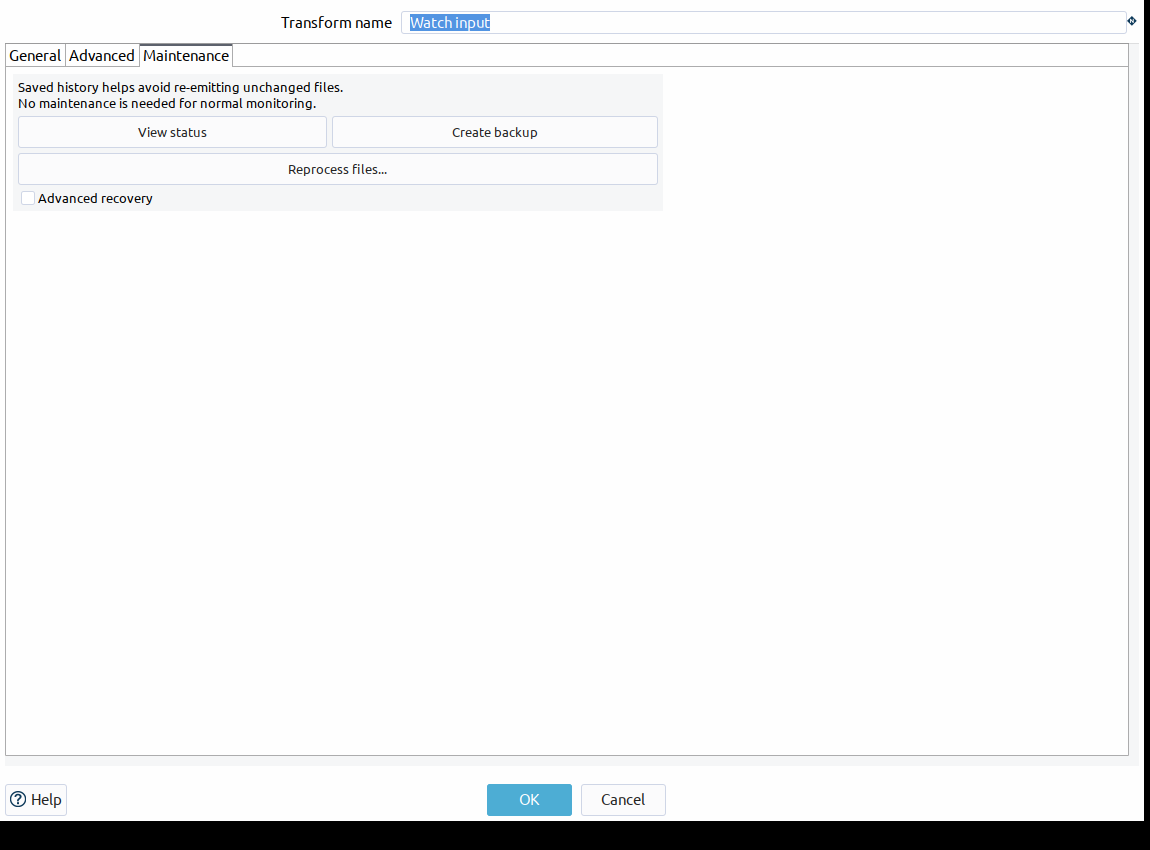
The Maintenance tab shows three everyday actions: View status, Create backup and Reprocess files. Select Advanced recovery to reveal Clear saved history, Restore backup and Update saved-state format. The results area is hidden until an action produces a result or error. Each action has hover help.
Actions resolve the state directory and Watch ID from the current form. They operate immediately, independently of OK/Cancel; cancelling the configuration dialog does not undo an explicit recovery action.
Mutations require the watcher to be stopped and acquire the same OS lock as a running source.
Each destructive action asks for confirmation and first archives the reserved artifacts for that Watch ID in <watch-id>.history/<timestamp>-<uuid>.
Backups are retained until an operator removes them; monitor disk usage and apply your own retention policy.
-
View status shows a stopped checkpoint’s schema, generation, root and observed count. In the same JVM, it can show the running source’s immutable diagnostics snapshot. A source running in another process retains its lock and must be inspected through that process’s logs.
-
Create backup archives the current artifacts, including corrupt files for investigation, without changing the checkpoint.
-
Reprocess files opens a separate window to choose a one-time filename regular expression. The input uses grouped annotated metadata widgets, validates the expression and leaves history unchanged when cancelled. Confirming the subsequent state action removes only observations matching that selection. The saved pipeline replayFilter is retained as the initial choice and is not changed by the one-time selection. On the next start, matching files still present are eligible for CREATED after readiness checks. Enable Created before replay. Already deleted content cannot be recovered, and downstream duplicates are possible.
-
Clear saved history backs up and removes only this Watch ID’s checkpoint artifacts. The next start follows First start without saved state; choose Process existing files deliberately if all existing matching files must be re-emitted.
-
Restore backup validates the selected checkpoint before replacing current state. It preserves the previous artifacts and records durable commit intent during restoration. Scope compatibility is enforced when the watcher next starts.
-
Update saved-state format explicitly rewrites valid schema 1 state as schema 2 without changing its observed entries, preserving a backup.
Periodic diagnostics include observed and pending counts, successful scans/checkpoints, retries, native overflows, emitted/suppressed events, last successful scan time and most recent scan/checkpoint duration. Slow-operation warnings identify completed scans, stats and checkpoints; they do not cancel blocked VFS calls. Configure the provider’s connection/session timeouts as well.
Reconciliation, errors and limits
Complete scans compare actual metadata with acknowledged state and recover missed create/modify/delete changes. Failed, incomplete or cancelled scans never infer deletions; the last valid state is retained and reconciliation retries at the polling interval. Root disappearance or permission failure during execution is treated as an unavailable scan, rather than mass deletion. Stability probe failures retain candidates for retry. Invalid startup roots, regexes, state directories and checkpoints fail initialization. Checkpoint write failures fail the transform. Configured file/directory/candidate limits fail safely and require a larger limit; they are not transient retries.
Native hints are capped by Native hint capacity. Excess hints request reconciliation rather than accumulating without bound. Acknowledged files and pending candidates are bounded by Maximum entries, as are visited/registered directories. Hop’s bounded rowsets provide downstream backpressure. No unbounded output-event queue or scheduler is created. A slow downstream can delay watching, scans and checkpoints; WatchService overflow then requests a scan when execution resumes. A VFS provider may materialize a full directory listing internally; configure provider connection/read timeouts and size the process for the monitored tree. Closing the WatchService wakes the native poll, and polling waits are notified on Stop. In-flight remote calls depend on the provider’s timeout support. Configure finite connection and session/read timeouts on named VFS connections. Providers such as SFTP may retry a timed-out read, so stop latency can exceed a single configured timeout.
Symbolic links are skipped and recursive native traversal does not follow links. Providers must report symbolic links accurately; visited-directory identities also prevent simple loops. Windows drive paths, file URIs and UNC paths are resolved through VFS; native paths use NIO Path normalization rather than string prefix matching. Local file URIs are normalized using UTF-8 decoding. Literal percent signs in native paths are escaped for VFS resolution, and filters use decoded base filenames. Use POLLING for network mounts with unreliable native events.
Reconciliation recovers persisting state differences, not every transient operation. A file created and removed entirely between observations cannot be reconstructed. Changes which restore the previous size and timestamp cannot be detected without a content/identity strategy. Renames are modeled as DELETED old URI and CREATED new URI. No content hashes or content reads are performed.
Output fields
| Field | Hop type | Meaning |
|---|---|---|
filename |
String |
Local filename or VFS URI, usable by existing filename-from-field readers. |
short_filename |
String |
Base filename. |
path |
String |
Parent directory URI. |
uri |
String |
Normalized VFS file URI used as identity. |
event_type |
String |
CREATED, MODIFIED or DELETED. |
size |
Integer |
Size in bytes (Long). |
last_modified |
Date |
File modification time. |
detected_at |
Date |
Time the emitted version was detected as ready; deletion uses the reconciliation time. |
is_directory |
Boolean |
Always false; this source emits regular files. |
scheme |
String |
VFS scheme. |
previous_size |
Integer |
Previously acknowledged size; null for CREATED. |
previous_last_modified |
Date |
Previously acknowledged modification time; null for CREATED. |
watch_id |
String |
Resolved Watch ID. |
DELETED rows carry the previous file’s metadata because the file no longer exists.
Filter out DELETED before sending filenames to a reader.
For local filenames containing a literal percent sign, filename is a file URI so existing VFS readers can resolve the escape safely.
Example
The bundled watch-files/watch-files.hpl sample monitors ${PROJECT_HOME}/watch-files/input and writes filename, event type, size and modification time to the log.
Create or modify a CSV in that directory, wait for stability, then stop the pipeline.
Restart it after adding a CSV while stopped to observe recovery.
Its sibling state directory persists checkpoints.
For ingestion, connect Watch Files to Filter Rows (event_type != DELETED), then Text File Input or JSON Input configured to take filenames from the filename field.
Readers remain responsible for content parsing and their usual error handling.
Scope
The initial implementation supports the normal Local Hop Engine only. It has no JDBC state backend, distributed state, HA coordination, leader election, Beam/Spark/Flink support or mandatory checksum. Windows and Ubuntu/OpenSSH SFTP behavior, Linux native overflow and SWT GUI interaction have integration coverage. Other remote providers, macOS/UNC behavior, large-scale capacity and power-loss durability still need validation in the target deployment.