
Hop Concepts
Core Concepts
Before we dive into building, let’s take a minute to understand the mental model behind Apache Hop.
Metadata is at the core of literally everything in Hop.
Pipelines, workflows, relational database connections, run configurations, unit tests, and servers are all defined as metadata objects.
You define a metadata item once (for example, a database connection called CRM) and reference it everywhere by name.
When a credential or host changes, you update it once in your project metadata and every pipeline and workflow automatically adopts the change.
See the full list of metadata types.
Pipelines vs. Workflows: At a Glance
The most critical architectural concept in Hop is the distinction between Pipelines and Workflows. They may look visually similar in the GUI canvas with icons connected by arrows, but they operate completely differently:
| Concept | Pipeline (.hpl) |
Workflow (.hwf) |
|---|---|---|
Primary Role |
Data Worker (Processes & transforms rows) |
Orchestrator (Coordinates jobs & tasks) |
Building Blocks |
||
Execution Mode |
Parallel (All transforms run simultaneously) |
Sequential (Actions run one after another) |
What Flows on Hops |
Real data rows streaming through in-memory buffers |
Control flow / Exit status (Success or Failure) |
Starting Points |
One or more pipeline sources |
Exactly one Start action |
Back-Pressure |
Automatic (upstream pauses if downstream is slow) |
N/A (state machine progresses step by step) |
Typical Operations |
Reading tables, filtering, joining streams, cleaning rows |
Checking prerequisites, running pipelines, alerting |
The diagram below illustrates how Workflows serve as the orchestration control plane, firing parallel Pipelines as the data processing engine across your infrastructure:
Item types
- Action
An Action is a single operation performed in a Workflow. Actions are executed sequentially one after another by default, with parallel branch execution available as a configuration option. When an action finishes, it returns a success or failure status (true or false). This status determines which outgoing hops the workflow follows next. Actions can also pass variables, lists of files, and summary rows to subsequent actions. See the Actions catalog for all available workflow actions.
- Hop
A Hop links Actions in a Workflow or Transforms in a Pipeline. In Workflows, Hops operate based on the exit status of previous Actions, Hops in Pipelines pass data between Transforms.
- Pipeline
Pipelines are the data workers of Apache Hop. Operations in a pipeline read, transform, enrich, clean, validate, and write data. A pipeline starts with one or more pipeline sources and runs every transform in parallel. Data travels between transforms along hops through in-memory row buffers, ensuring high throughput and automatic back-pressure. See Pipelines for detailed execution mechanics, engines, and production scenarios.
- Transform
A Transform is a single unit of data processing inside a Pipeline. Typical transform operations include reading from databases or files, filtering rows, calculating values, performing lookups, joining datasets, and loading to destinations. All transforms in a pipeline run simultaneously in parallel. Pipeline sources generate rows without needing an incoming hop, while intermediate transforms continuously process streaming rows and pass them along hops to downstream transforms through in-memory row buffers. See Transforms for where to find the page of each transform.
- Workflow
A Workflow is the orchestrator of your data architecture. Workflows execute a series of actions sequentially by default (with optional parallel branches). Workflows manage control flow rather than streaming individual rows: they check prerequisites, prepare environments, execute pipelines, manage files, handle errors, and send notifications. Hops in a workflow decide which path to follow based on whether an action succeeded or failed. See Workflows for in-depth orchestration concepts, decision backtracking, and scheduling scenarios.
Projects and Environments
- Project
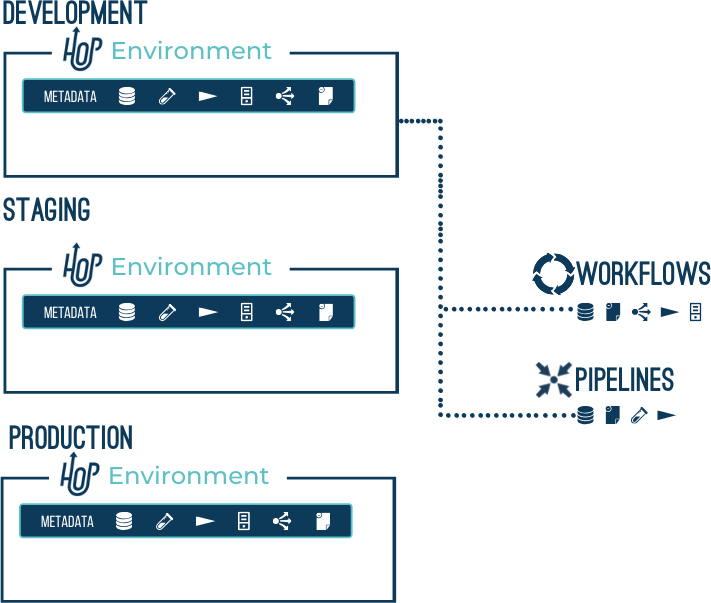
Hop Projects are a conceptual grouping of configurations, variables, metadata objects and workflows and pipelines.
Projects can inherit metadata from parent projects.
A project contains one or more environments where the actual configuration is defined.
Example: a 'Sales' project contains a 'customers' database connection and a number of workflows and pipelines.
The runtime configurations, database connection properties etc are defined in the 'dev', 'uat' and 'prd' environments.
- Environment
Hop Environments are instances of projects that hold the actual runtime configurations and other metadata objects for a project.
Example: the 'dev' environment for the 'Sales' project specifies to read from host '10.0.0.1' for the 'customers' database connection
Fields, Parameters, and Variables
In Hop, values belong to three distinct categories:
-
Fields: The named and typed columns on a data row in a pipeline (e.g.
customer_idas an Integer,order_dateas a Date). Fields travel across hops between transforms. -
Parameters: Named inputs declared on a pipeline or workflow. They allow you to pass external values into a job at runtime (for example, passing a specific date or processing batch ID).
-
Variables: Named environment and system variables (e.g.
${PROJECT_HOME}or${JAVA_HOME}). Variables are resolved in text fields and paths across Hop.
See Fields, parameters, and variables for a comprehensive guide on their scopes and behaviors.
Where to Go Next
Now that you know the vocabulary:
-
Continue with the Hop Gui Overview to explore the user interface.
-
Or dive deeper into the dedicated architecture guides:
-
Pipelines Deep Dive — Learn about parallel streaming, in-memory row buffers, execution engines, and real-world scenarios.
-
Workflows Deep Dive — Learn about orchestration, conditional decision hops, and backtracking path exploration.
-