
Concepts
Apache Hop is designed around a clean separation of concerns: Workflows orchestrate jobs and processes step by step, while Pipelines perform high-throughput streaming data processing in parallel.
Tools
- Hop Conf
Hop Conf is a command line tool to manage various aspects of your Hop configuration: projects, environments, cloud configuration and more
- Hop Encrypt
Hop Encrypt is a command line tool that obfuscates or encrypts a plain text password for use in XML, password or metadata files. Make sure to also copy the password encryption prefix to indicate the obfuscated nature of the password. Hop will then be able to make the distinction between regular plain text passwords and obfuscated ones.
- Hop Gui
Hop Gui is the visual IDE where Hop data developers create, test, run and manage the life cycle for workflows and pipelines. In addition to functionality for development and life cycle management, Hop Gui contains tools and perspectives to manage projects and environments, to search and manage metadata, to manage and version control a large variety of files and to explore logging in a Neo4j graph.
- Hop Run
Hop Run is a command line tool to run workflows and pipelines, with options to (list or) specify projects, environments, properties and run configurations.
- Hop Search
Hop Search is a command line tool to search all metadata available in a specific project or environment.
- Hop Server
Hop Server is a web service interface to manage and run workflows and pipelines.
Item types
- Action
An Action is a single operation performed in a Workflow. Actions are executed sequentially one after another by default, with parallel branch execution available as a configuration option. When an action finishes, it returns a success or failure status (true or false). This status determines which outgoing hops the workflow follows next. Actions can also pass variables, lists of files, and summary rows to subsequent actions. See the Actions catalog for all available workflow actions.
- Hop
A Hop links Actions in a Workflow or Transforms in a Pipeline. In Workflows, Hops operate based on the exit status of previous Actions, Hops in Pipelines pass data between Transforms.
- Pipeline
Pipelines are the data workers of Apache Hop. Operations in a pipeline read, transform, enrich, clean, validate, and write data. A pipeline starts with one or more pipeline sources and runs every transform in parallel. Data travels between transforms along hops through in-memory row buffers, ensuring high throughput and automatic back-pressure. See Pipelines for detailed execution mechanics, engines, and production scenarios.
- Transform
A Transform is a single unit of data processing inside a Pipeline. Typical transform operations include reading from databases or files, filtering rows, calculating values, performing lookups, joining datasets, and loading to destinations. All transforms in a pipeline run simultaneously in parallel. Pipeline sources generate rows without needing an incoming hop, while intermediate transforms continuously process streaming rows and pass them along hops to downstream transforms through in-memory row buffers. See Transforms for where to find the page of each transform.
- Workflow
A Workflow is the orchestrator of your data architecture. Workflows execute a series of actions sequentially by default (with optional parallel branches). Workflows manage control flow rather than streaming individual rows: they check prerequisites, prepare environments, execute pipelines, manage files, handle errors, and send notifications. Hops in a workflow decide which path to follow based on whether an action succeeded or failed. See Workflows for in-depth orchestration concepts, decision backtracking, and scheduling scenarios.
Projects and Environments
- Project
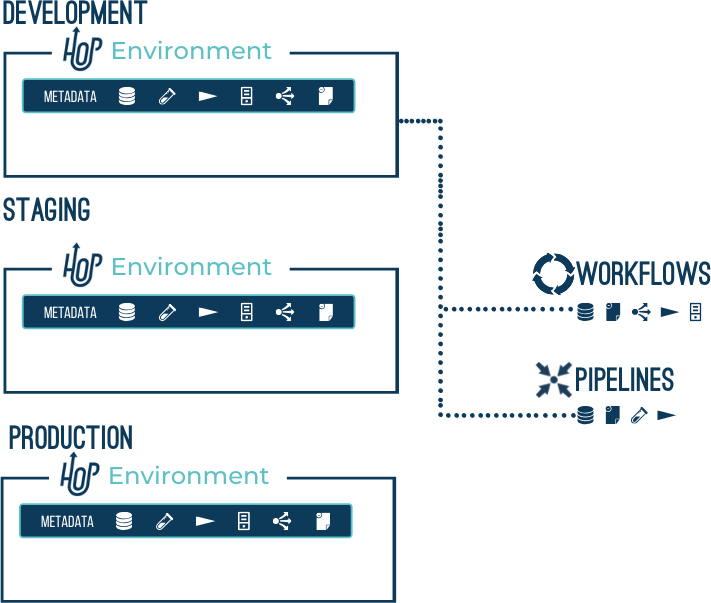
Hop Projects are a conceptual grouping of configurations, variables, metadata objects and workflows and pipelines.
Projects can inherit metadata from parent projects.
A project contains one or more environments where the actual configuration is defined.
Example: a 'Sales' project contains a 'customers' database connection and a number of workflows and pipelines.
The runtime configurations, database connection properties etc are defined in the 'dev', 'uat' and 'prd' environments.
- Environment
Hop Environments are instances of projects that hold the actual runtime configurations and other metadata objects for a project.
Example: the 'dev' environment for the 'Sales' project specifies to read from host '10.0.0.1' for the 'customers' database connection
Metadata
Hop Metadata is the central storage repository for shared metadata like relational database connections, run configurations, servers, git repositories and so on. Metadata is persisted as json and is stored by default in a project’s base folder.
Data types
As a best practice for producing consistent, predictable outcomes when working with your data in Apache Hop, you must consider how the Apache Hop engine processes different data types and field metadata in transformations and jobs.
| As a rule, data is never modified by metadata inside of Apache Hop. Data is only modified when Apache Hop writes to files or similar objects, but not to databases. |
Apache Hop data types map internally to Java data types, so the Java behavior of these data types applies to the associated fields, parameters, and variables used in your workflows and pipelines. The following table describes these mappings.
| Apache Hop | Java data type | Description |
|---|---|---|
BigNumber |
BigDecimal |
An arbitrary unlimited precision number. |
Binary |
Byte[] |
An array of bytes that contain any type of binary data. |
Boolean |
Boolean |
A boolean value true or false. |
Date |
Date |
A date-time value with millisecond precision. |
Integer |
Long |
A signed long 64-bit integer. |
Internet |
Address |
InetAddress An Internet Protocol (IP) address. |
Number |
Double |
A double precision floating point value. |
String |
String |
A variable unlimited length text encoded in UTF-8 (Unicode). |
Timestamp |
Timestamp |
Allows the specification of fractional seconds to a precision of nanoseconds. |
| Apache Hop also comes with a number of additional complex data types (e.g. Avro, JSON, Graph) that have no one-on-one mapping to Java data types. These data types only work with specific transforms and can’t be used in general-purpose transforms. |
Conversions and comparisons
Nulls and sort order
-
Null handling and sort behavior follow Java comparison semantics for the mapped type, unless noted below.
String parsing/formatting
-
When converting from a String to another type, Hop uses the format settings defined in the transform metadata (for example, date masks, decimal symbols, and grouping characters).
-
When converting from another type to a String, Hop applies the same metadata-based format.
Be explicit about formats when working with String types.
A common issue is the decimal separator, which differs between environments: an EU locale typically uses ,, a US locale uses ..
See Formatting numbers and dates for Format, Length, Precision, Decimal, Group and Currency.
Boolean
A Boolean field holds true, false or null.
Reading text as a Boolean
-
Without a Format,
Y,yes,true(in any case) and1are read as true. Any other text is read as false, and empty text is null. -
With a Boolean Format such as
on/off, text that matches the true or the false part of the mask (ignoring case) is read as that value. Text that matches neither part falls back to the rules above.
Writing a Boolean as text
This applies wherever Hop turns a Boolean into text: Write to log, the preview grid, text files, Concat fields and so on.
-
With a Boolean Format, Hop prints the true or the false part of the mask.
-
Without a Format, the field’s Length decides: a length of 3 or more prints
true/false, any other length (including no length) printsY/N.
A Boolean Format is the text for true, a slash, and the text for false, for example true/false, Y/N, 1/0 or yes/no.
The mask must contain exactly one slash, so neither text can contain a slash itself.
Spaces around the slash are ignored, and the two texts must differ in more than upper and lower case.
The Format column offers the common masks for Boolean fields, and you can type any other pair, for example Ja/Nein to write German words.
See Your own true and false text.
Why two Boolean fields can print differently
The length is often set for you rather than by you.
Converting a String field to a Boolean, for example in the Meta-data tab of Select Values, keeps the String’s length.
A true/false column read from a database with length 4 therefore becomes a Boolean of length 4 and prints true, while a Boolean read by JSON Input has no length and prints Y.
Both values are the same true.
Set a Boolean Format on the fields to get the same text everywhere, whatever their length.
Timestamp
A Timestamp value can be created from a Date, String, Number, or another Timestamp.
Conversions
-
Date → Timestamp: Represents the same instant; fractional seconds default to
0. -
String → Timestamp: Parsed using the specified date mask (for example,
yyyy-MM-dd HH:mm:ss). -
Number → Timestamp: Interpreted as nanoseconds since the epoch.
UUID
UUID values map to java UUID object that stores them as 16-byte type. Storing a UUID with the String type uses 32-byte. The difference in storage is noticeable in many situations like inserting in a database with native UUID support.
When using MongoDB, Hop writes UUIDs using the STANDARD representation, which corresponds to BSON Binary subtype 4.
Sorting
Databases may order UUID columns by their raw binary value (as is the case in PostgreSQL). Hop, however, compares UUIDs by their two 64-bit halves as signed longs — first the most significant bits (MSB), then the least significant bits (LSB). These ordering methods can differ. To ensure consistent results, perform all sorting either within Hop or entirely in the database.
Gotchas
Writing a UUID to a database without native support as a UUID type (e.g. MySQL) will fail. Convert them to String before writing.
JSON
The JSON type in Hop follows the official JSON standard: https://www.json.org/json-en.html. It is treated as an unordered set of key/value pairs. This means that JSON values may behave differently from their String representations. For example, consider these two JSON objects:
{ "a": 1, "b": 2 }{ "b": 2, "a": 1 }When treated as String, they are different. When treated as JSON, they are considered equal. Because JSON comparison in Hop performs structural checks, it is generally more robust — but also slightly slower — than string comparison.
Sorting
The way Hop sorts JSON values resembles how PostgreSQL sorts JSONB values. Keys are sorted alphabetically, and values are compared in the following type order:
NULL < MISSING < BINARY < STRING < NUMBER < BOOLEAN < ARRAY < OBJECTArrays are compared element by element; if all compared elements are equal, the longer array is considered greater.
MongoDB
The JSON type supports all standard JSON values when reading or writing to MongoDB. Values that are part of MongoDB’s extended JSON (for example, Date objects) are not supported. To fully support MongoDB-specific BSON values, use the String type instead.
Vector
The Vector type holds a dense floating point vector, as produced by an embedding model and consumed by a vector store.
Values are stored as a float[].
The canonical text form is a bracketed, comma separated list of numbers:
[0.1,0.2,0.3]That form is both valid JSON and the literal syntax pgvector accepts, so a vector survives a round trip through a text file, a Data Grid, a JSON document or a database column without a conversion step in between.
Conversions
Vector converts to and from String using the canonical text form above. Conversion from other types is not supported: convert to String first if an intermediate type is involved.
Databases
When Hop generates DDL, a vector field becomes the database’s own vector column wherever there is one:
| Database | Dimension known | Dimension unknown |
|---|---|---|
PostgreSQL |
|
|
Oracle 23ai and later |
|
|
SQL Server 2025 and later |
|
text |
MySQL 9 and later |
|
text |
CrateDB |
|
text |
DuckDB |
|
|
Whether the type is available is decided per server rather than per database product. Oracle and SQL Server grew their vector type at a known release, so the dialect compares the version the driver reports. On PostgreSQL the type comes from the pgvector extension, which is installed per database, so the dialect looks for the type in the list the driver reports instead of comparing versions. A connection to a database without the extension therefore writes a text column, and so does a server older than the release that introduced the type. Generating DDL without a connection keeps the native type, because an unknown server is not treated as a server that lacks it.
A database with no vector type of its own writes a text column, which holds the canonical form above. That is also what a vector without a dimension falls back to where the native type has no unsized spelling.
Hop sends the value in whatever form the database accepts, which is not always the text form: PostgreSQL needs it as an unspecified type so the server applies the column’s own input function, MySQL takes its storage format of one little endian float32 per dimension, and CrateDB takes a float array. Oracle, SQL Server and DuckDB accept the text form as it stands. None of this is configurable, and none of it changes what a pipeline looks like.
Dimensions
The field’s length carries the number of dimensions, the way it carries the size of a String.
A length of zero or less means the dimension is unspecified.
Hop never pads or truncates a vector to match a declared length. An embedding resized to fit would still return results from a vector store, and those results would be wrong, so a mismatch is left for the store to reject.
Gotchas
The type does not itself enforce the number of dimensions. A vector store will reject a value whose length does not match the column it is written to, so the dimensions of the embedding model and of the target column have to be kept aligned by the pipeline author.
Formatting numbers and dates describes Format, Length, Precision, Decimal, Group and Currency — the field metadata used whenever Hop converts a value to or from a String.
Core Guides
For in-depth explanations of how Hop executes and orchestrates data solutions:
Various
The following items are concepts that are used throughout Hop and will be mentioned at various locations in the Hop tools and documentation.
- Fields, parameters, and variables
Fields are the typed columns on a data row. Parameters are named inputs declared on a pipeline or workflow; they become variables of the same name when that file starts. Variables are named string values in a scope (environment, project, run configuration, workflow, or pipeline). See Fields, parameters, and variables for the comparison, how values flow, and the common pitfalls.
- Lazy Loading
If enabled, all data conversions (character decoding, data conversion, trimming, …) for the data being read will be postponed as long as possible, effectively reading the data as binary fields.
Enabling lazy conversion can significantly decrease the CPU cost of reading data.
When to avoid: if the data conversion needs to be performed later in the stream anyway, postponing the conversion may slow things down instead of speeding up.
When to use: use cases where Lazy Conversion may speed things up when 1) data is read and written to another file without conversion, 2) data needs to be sorted and doesn’t fit in memory.
In this case, serialization to disk is faster with lazy conversion because encoding and type conversions are postponed, or 3) bulk-loading to database without the need for data conversion.
Bulk loading utilities typically read text directly and the generation of this text is faster (this does not apply to Table Output).