
 OData input
Description
The OData input transform enables you to query OData (Open Data Protocol) services. OData is an OASIS standard that defines a set of best practices for building and consuming RESTful APIs. For more information, visit the official OData Documentation.
This transform is an input transform: it issues GET requests against an Entity Set and streams each entity as a Hop row. JSON properties are mapped with an OData Path. Pagination follows @odata.nextLink (OData V4) and __next (OData V2), including relative next-link URLs.
The Connection, Query, and Fields values all accept Hop variables (${VARIABLE}).
Connection Options
The Connection tab allows you to configure the service endpoint and optional credentials.
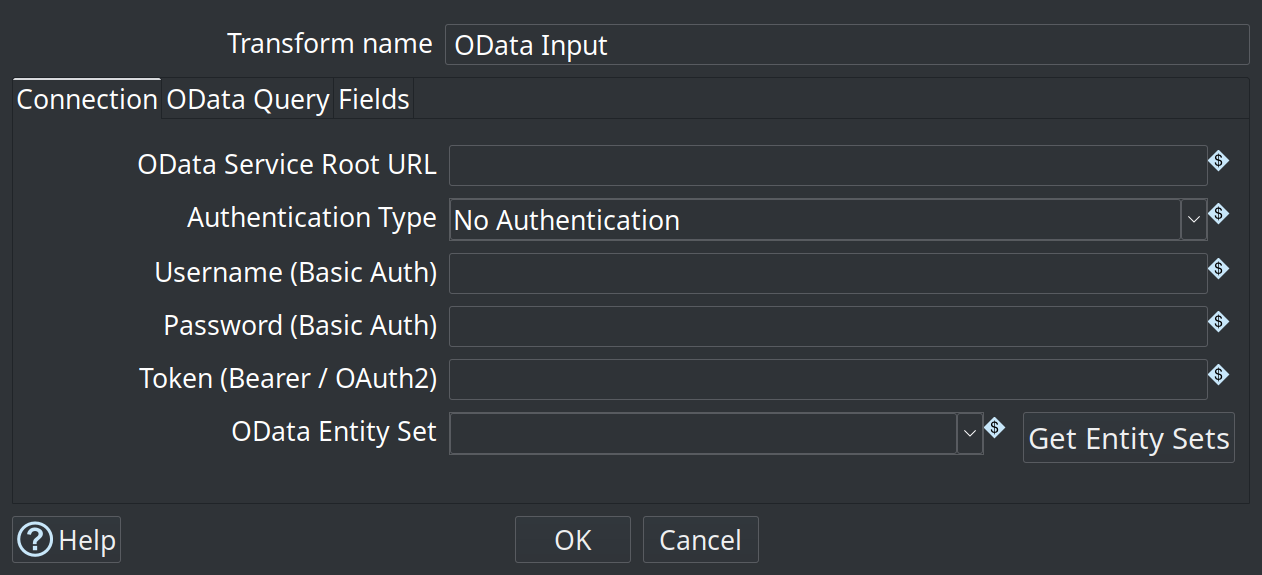
| Option | Description |
|---|---|
Transform name |
Name of this transform as it appears in the pipeline workspace. |
OData Service Root URL |
The base URL of the OData service, without the entity set name (e.g., |
Authentication Type |
The authentication type to use: * |
Username (Basic Auth) |
The username for Basic authentication. |
Password (Basic Auth) |
The password for Basic authentication. |
Token (Bearer / OAuth2) |
The bearer token value (without the `Bearer ` prefix). |
OData Entity Set |
The OData entity set to query (e.g., |
Get Entity Sets |
Calls the service root URL and fills the Entity Set drop-down from the catalog ( |
Query Options
The OData Query tab appends standard OData system query options to the first request URL.
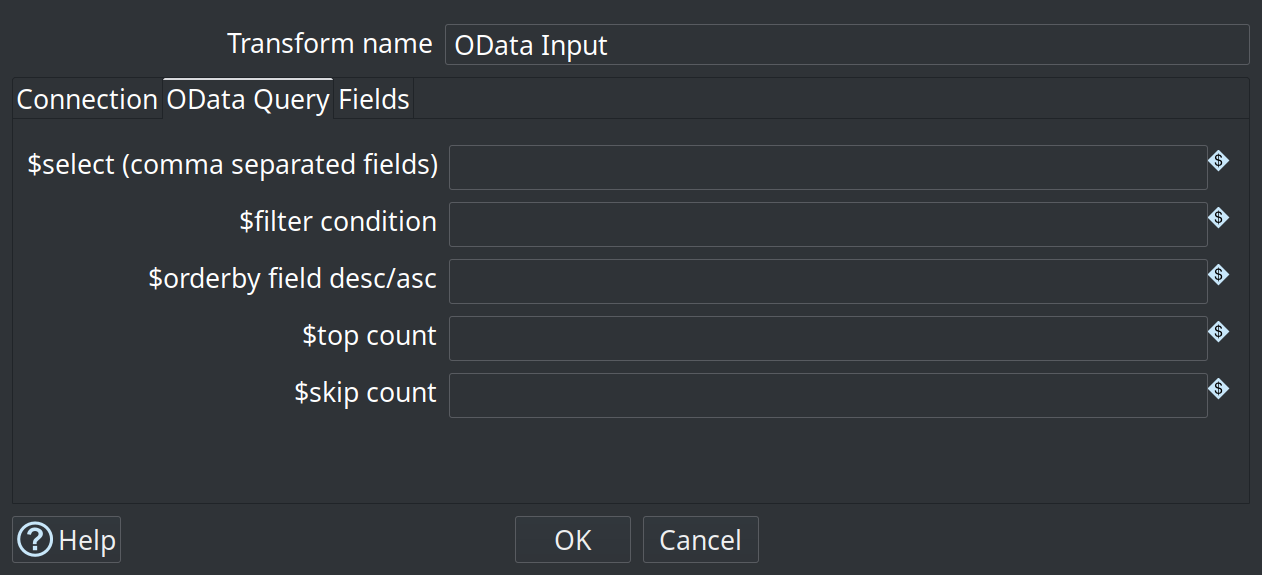
| Option | Description |
|---|---|
$select |
A comma-separated list of properties to select (e.g., |
$filter |
An OData expression to filter matching entities (e.g., |
$orderby |
Specifies the sorting order of the results (e.g., |
$top |
Limits how many entities the first request asks for (e.g., |
$skip |
Specifies the number of entities to skip from the beginning of the list on the first request. |
There is no dedicated $expand, $count, or $search field. Complex nested collections are not exploded into extra rows.
|
Fields Mapping
The Fields tab defines how properties in the returned OData JSON response map to Apache Hop row fields.
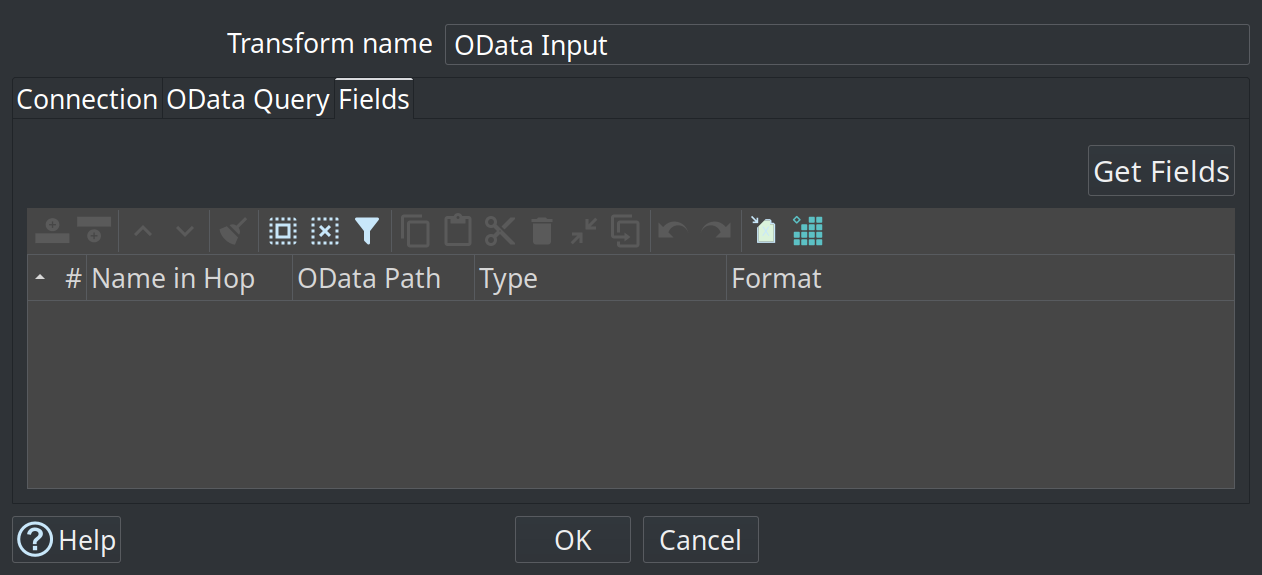
| Option | Description |
|---|---|
Name in Hop |
The name of the field as it will be produced in the Apache Hop pipeline. Variables in the name are resolved at runtime. |
OData Path |
Slash-separated JSON object path within one entity (e.g., |
Type |
The Hop data type: String, Integer, Number, Date, Boolean, or BigNumber. Integer is read as a Long and Number as a Double. Other types, including BigNumber, are read as text. |
Format |
Optional conversion mask for date or numeric fields. See Formatting numbers and dates. |
Get Fields |
Calls the service |
|
OData date/time values that fail to parse are emitted as |
Behaviour
-
Requests use
Accept: application/json. Atom/XML payloads are not parsed as rows. -
OData V4 responses use a
valuearray. OData V2 usesd.results, adarray, or a singledobject. -
When a page includes
@odata.nextLinkor__next, the transform keeps fetching until the service stops paging. Relative next-link URLs are resolved against the previous request. -
A non-200 HTTP status fails the transform.
-
Get Entity Sets and Get Fields can be used more than once in the same Hop Gui session.
Example
To query the public Northwind OData V4 service:
-
Set the Service Root URL to
https://services.odata.org/V4/Northwind/Northwind.svc. -
Click Get Entity Sets and choose
Products, or typeProducts. -
Open the Fields tab and click Get Fields, or add
ProductID(Integer) andProductName(String) yourself. -
Optionally, on OData Query, set
$selecttoProductID,ProductName,$filtertoProductID le 3,$orderbytoProductID, and$topto3. -
Preview or run the pipeline. The first three products are Chai, Chang, and Aniseed Syrup.
Sample pipeline (Samples project):